


 Smita Diwan
The conversation used to be about keeping children away from screens. That conversation is over. In 2026, the average Indian child is online before entering primary school—at age six, sometimes younger. The question parents now face is not if their child will navigate the digital world, but how safely they will do so. And the uncomfortable truth is this: most parents are three steps behind. Seventy-two percent of parents are unaware of the coded language children use online.
Online predators, drug dealers, and peer pressure don’t announce themselves with warning signs. They communicate in a carefully constructed language of emojis, acronyms, and coded phrases that children learn quickly — and that most adults have never seen. This article is your decoder ring. Read it, save it, share it with every parent you know.
The Hidden Emoji Language: What Those Symbols Really Mean
Emojis were designed for innocent expression. They have been systematically repurposed by drug communities and online bad actors into a visual code that flies completely under parental radar. If your child’s chat history contains any of the following combinations, it warrants a calm, non-accusatory conversation.
Drug-Related Emoticons Adults Must Know
- Mushroom 🍄: Refers to psilocybin mushrooms (psychedelics/magic mushrooms)
- Leaf / Clover 🌿🍀: Marijuana or cannabis; common in buying/selling conversations
- Unicorn 🦄: Refers to MDMA (ecstasy); often combined with rainbow emoji
- Rainbow 🌈: Used alongside unicorn to indicate ecstasy or party drugs
- Pill + Test Tube 💊🧪: Prescription drug abuse or synthetic substances
- Snowflake + Lightning ❄️⚡: Cocaine (snowflake) or stimulants/amphetamines (lightning)
- Diamond / Crystal 💎: Crystal meth (methamphetamine) in drug-trade slang
- Cigarette + Salt Shaker 🚬🧂: Indicates smoking or snorting substances
Point to Note: No single emoji is proof of anything. Children also use these for their literal meanings. What to watch for is clusters of these symbols appearing together, especially combined with requests for money, secrecy, or meeting strangers.
Chat Acronyms That Should Set Off Alarm Bells
Perhaps more alarming than drug-related emojis is the vocabulary of grooming and exploitation that has become normalised in teen chat culture. These acronyms are specifically designed to evade parental detection — some are even crafted to let a child signal that a parent is nearby, buying time for the online contact to switch topics.
GNOC: Get Naked on Camera
Used by predators to solicit images. Extremely serious if found in a child’s chats.
PIR: Parent In Room
A warning signal to pause inappropriate conversation when an adult is nearby.
99: Parent Gone
Signals that the parent has left and the child can now speak freely again.
MIRL: Meet In Real Life
A request to move from online communication to a physical meeting. High-risk.
KPC: Keeping Parents Clueless
A deliberately secretive posture — the contact wants the relationship hidden from adults.
WTTP: Want to Trade Pictures?
A request to exchange images. Can escalate rapidly to explicit content solicitation.
TDTM: Talk Dirty to Me
Sexually explicit solicitation. Should never appear in a child’s messages.
NSFW: Not Safe for Work
While broadly used online, in a child’s context, it flags exposure to adult content.
“The most dangerous feature of this coded language is not what it says — it’s that it was specifically designed so that parents would not understand it.”
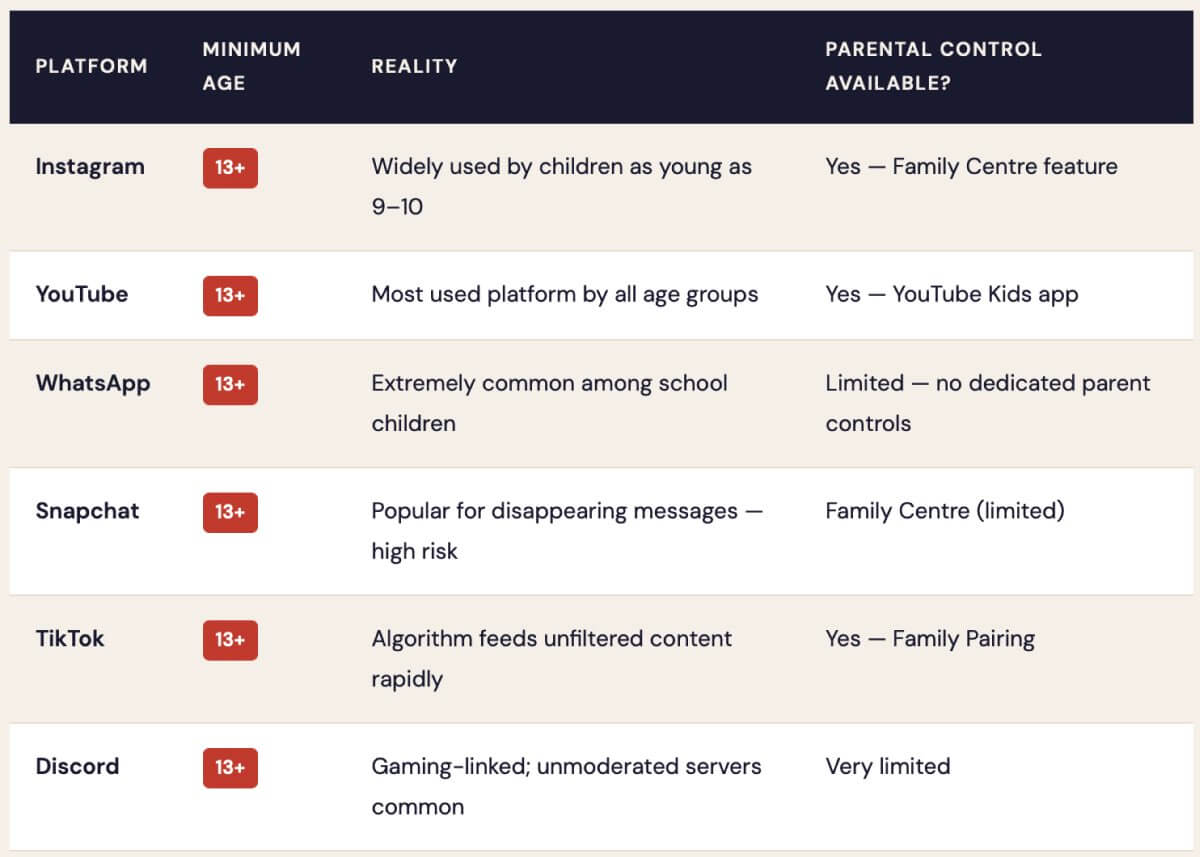
Social Media Age Limits: The Rules, and Why They’re Broken Daily
Every major platform has a minimum age policy. Almost every child ignores it — with or without parental knowledge. Here’s what the rules actually say, and what parents can realistically do.
Google Family Link: A Practical Tool for Parents
One of the most actionable tools available to parents right now is Google Family Link — recently updated with a redesigned interface that makes it significantly easier to use. It works across Android devices and Samsung Galaxy Watches for children, giving parents meaningful oversight without requiring them to hover physically over their child’s shoulder.
What Google Family Link Can Do For You
The updated Family Link app allows parents to manage their child’s digital world from a single dashboard. The new Parent-Managed Contacts feature is particularly significant — parents can now approve exactly who their child is allowed to call and receive texts from.
- Set daily screen time limits by app
- Approve or block app downloads
- Lock the device remotely at bedtime
- View weekly activity reports
- Manage school downtime schedules
- Control who can contact your child
A Practical Action Plan for Parents
Surveillance without communication breeds exactly the secrecy you’re trying to prevent. The most effective digital safety strategy combines technical tools with open dialogue. Here is a clear, actionable framework.
01 Establish a family digital agreement early
Before a child gets their first device, agree on rules together — screen time limits, which apps are allowed, and no devices in bedrooms after a set hour. Children who help set the rules are more likely to respect them.
02 Keep devices in common spaces
The single highest-risk factor for online predation is a child using a device in a private space. Charging devices overnight in a parent’s room is a simple, non-negotiable rule that dramatically reduces risk.
03 Have “the conversation” — calmly and often
Tell your child explicitly: “If anyone online asks you for photos, to meet in person, or to keep secrets from us — you can tell me without getting in trouble.” Make it safe for them to come to you.
04 Audit their friend lists together
Periodically sit together and scroll through their contacts and followers. Any account they cannot name or explain in person is a red flag.
05 Use parental controls—but be transparent about it
Covert monitoring damages trust if discovered. Transparent oversight is both more ethical and more effective. “I can see your screen time because I’m your parent” is a healthy, honest approach.
06 Know the red flags of grooming
Watch for your child becoming secretive about their phone, receiving unexpected gifts, withdrawing from family, or referencing an online “friend” who is significantly older. Act early — these patterns escalate.
“The goal is not to raise children who are afraid of the internet — it is to raise children who are equipped to navigate it.”
The digital world is not going away. Neither are the risks within it. But informed, engaged parents remain the most powerful protection a child has. Now that you understand some of the language, use that knowledge to start a conversation—not to surveil in silence.
The door you keep open is the one your child will walk through when they need help.
Save this article. Share it in your parent WhatsApp group. And tonight, have dinner without phones—and talk about what your child does online.