

 Smita Diwan
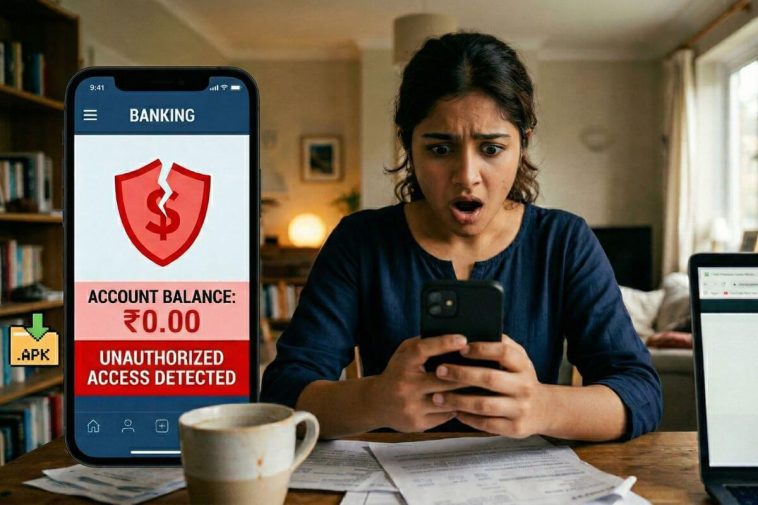
Every week, millions of people across India download something called an APK file — usually to get a paid app for free, access a streaming service not available in their region, or install a game someone sent them on WhatsApp. It feels harmless. It looks harmless. A tiny file, a quick install, and done. What most people don’t realise is that in those few seconds, they may have handed a stranger complete access to their phone, their banking apps, their contacts, their camera, and their identity.
This is not hypothetical. Android attacks jumped 29% in the first half of 2025 compared to the same period in 2024. The primary weapon? Malicious APK files. This article explains exactly what APK files are, why they are so dangerous, what the attackers can actually do once one is installed, and — most importantly — how to protect yourself and your family.
Also Read: Your Child Is Already Online. Do You Speak Their Secret Language?
What Exactly Is an APK File?
APK stands for Android Package Kit. It is the file format used by Android to distribute and install apps — essentially the Android equivalent of a .exe file on Windows. Every app on your Android phone, from WhatsApp to YouTube, arrived as an APK file. When you download an app from the Google Play Store, the APK is installed automatically and invisibly in the background. You never see the file itself.
How APKs Work — Simply Explained
Think of an APK file like a sealed box containing everything an app needs to run: its code, images, layout files, and a crucial document called the AndroidManifest.xml — which lists every permission the app wants from your phone.
When you install from the Play Store, Google checks this box before handing it to you. When you install an APK from anywhere else — a website, WhatsApp, a link in an email — that check never happens. You are installing a box that nobody has inspected. What’s inside is entirely unknown.
This unverified installation from outside the Play Store is called sideloading — and it is the single biggest application-based threat to Android users worldwide, according to Zimperium’s 2025 Global Mobile Threat Report.
What Can a Malicious APK Actually Do to You?
The answer is: almost anything. Modern malware APKs are sophisticated, patient, and designed to be completely invisible to the user. Here is what they are capable of, based on real malware families documented in 2025.
1. Drain Your Bank Account
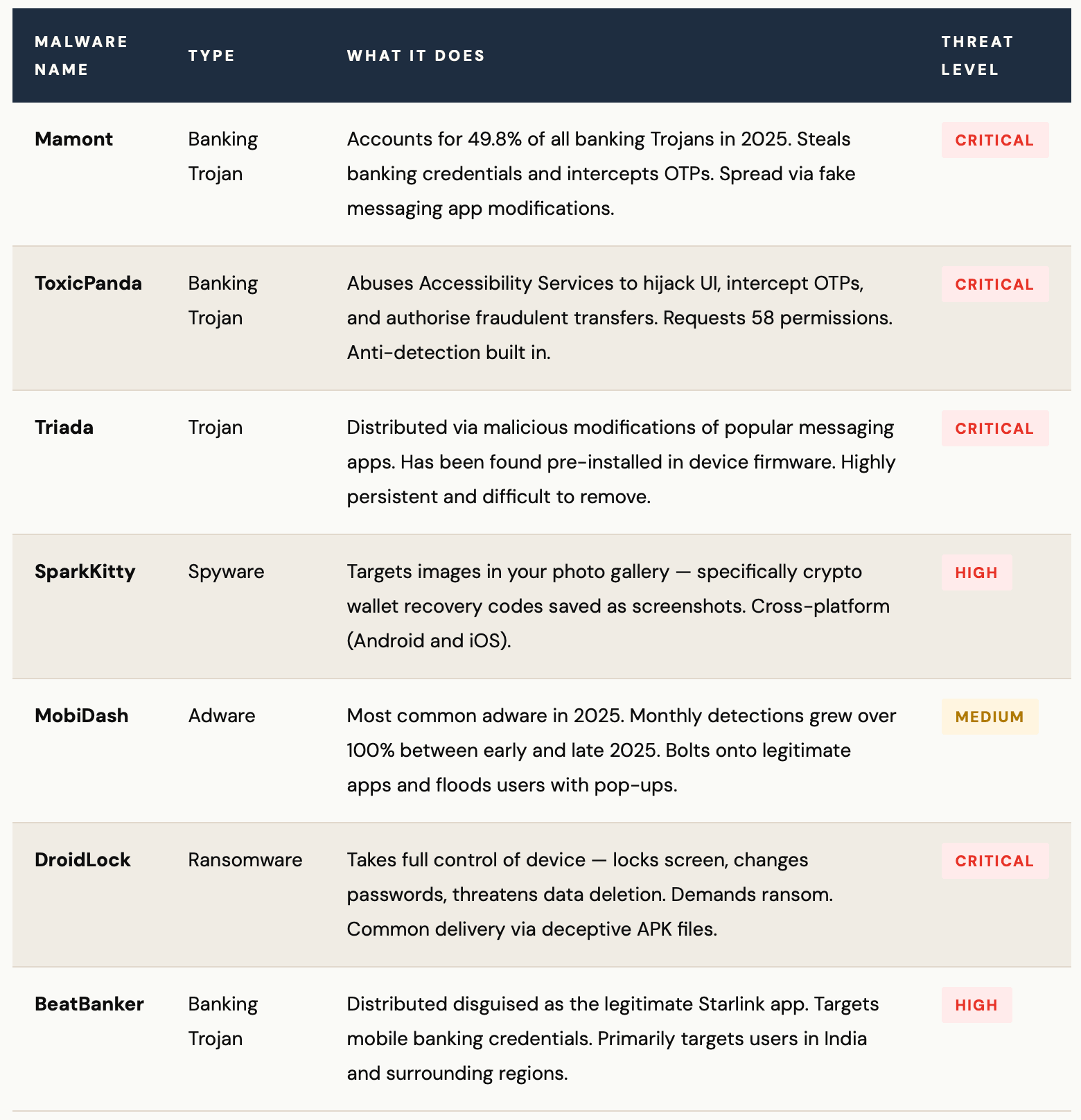
Banking Trojans like ToxicPanda and Mamont (which accounted for 49.8% of all banker malware in 2025) overlay fake login screens on top of your real banking app. You type your credentials — they capture everything. They can also intercept OTPs, meaning two-factor authentication offers zero protection.
2. Activate Your Microphone & Camera
Spyware APKs request Accessibility permissions and, once granted, can silently activate your microphone or camera without any indicator light or notification. Every conversation in your home becomes potentially audible to attackers.
3. Steal Your Photos & Screenshots
In Q2 2025, Kaspersky identified a malware strain called SparkKitty that specifically targeted crypto wallet recovery codes saved as screenshots. Any sensitive image in your gallery — Aadhaar cards, PAN cards, bank statements photographed for records — is at risk.
4. Harvest All Your Contacts
Many malicious APKs, including SpyLoan apps found pre-installed on some devices, collect entire contact lists. This data is then used to send scam messages to everyone you know — or to threaten and harass you using knowledge of your personal network.
5. Intercept Your Messages & OTPs
SMS-stealing malware has become a major threat in 2025. Once installed, these apps read every SMS you receive — including one-time passwords from your bank or email provider. The capability to steal OTPs is no longer experimental; it is being deployed at scale in coordinated campaigns.
6. Lock You Out of Your Own Device
2025 saw the rise of mobile ransomware variants like DroidLock that take complete control of your device — changing passwords, locking screens, and demanding payment for release. Unlike PC ransomware, victims often have no technical recourse except paying.
7. Turn Your Phone Into a Bot
The Kimwolf botnet hijacked nearly 1.8 million Android devices in 2025, using them to carry out cyberattacks on other targets. Your phone becomes a weapon — and you pay for the data usage, the battery drain, and the slowdown, all while suspecting nothing.
8. Mine Cryptocurrency on Your Device
Cryptojacking APKs silently use your phone’s processor to mine cryptocurrency for the attacker. Symptoms include a dramatically overheating phone, rapid battery drain, and unexplained data usage. Your phone ages years in months.
THE PERMISSION TRAP
The most common entry point for all of these attacks is Accessibility Services permission. This feature, designed to help people with disabilities control their phone, gives an app the ability to see and control everything on your screen — including other apps. ToxicPanda banking malware requests 58 separate permissions, including Accessibility Services, allowing it to intercept OTPs, fake login screens, and authorise fraudulent transactions without the user ever knowing.
The Malware Families Targeting You Right Now
These are not abstract threats. These are named, active, documented malware families that security researchers are tracking in real time — and that have already affected millions of users across South and Southeast Asia.
The 6 Most Common Ways Malicious APKs Reach You
Understanding the delivery methods is just as important as understanding the malware itself. Attackers are creative, patient, and increasingly sophisticated in how they get you to install their files.
- WhatsApp or Telegram messages with a link to “download the new version” of a popular app
- Phishing SMS from fake banks, courier companies, or government departments with an APK download link
- Websites offering paid apps, premium games, or streaming services for free
- Pop-up ads claiming your phone has a virus and offering a “security app” to fix it
- QR codes at physical locations linking to APK downloads instead of official app stores
- Pre-installed apps on budget Android devices purchased from unverified sellers
THE OFFICIAL STORE MYTH
Even the Google Play Store is not completely safe. Between June 2024 and May 2025, 239 malicious apps with over 42 million combined downloads were found and removed from the Play Store — a 67% increase in Play Store malware compared to the previous year. In summer 2025, researchers found 77 additional malicious apps with 19 million installations, distributing banking malware including Anatsa (TeaBot). The Play Store reduces risk significantly — but it does not eliminate it.
“Sideloaded apps are the leading application-based threat to Android users. Installing an APK from outside Google Play bypasses all safety checks — you are handing an unverified stranger the keys to your digital life.”
Why Indian Users Are Especially at Risk
India’s position as the world’s largest Android market — with over 600 million Android users — makes it an especially attractive target for mobile malware campaigns. Several factors compound the risk specifically for Indian users.
WHY INDIA IS A PRIME TARGET
UPI and mobile banking adoption: India’s rapid embrace of digital payments means an attacker who compromises your phone can access your UPI apps, net banking, and mobile wallets in one stroke. Banking Trojans that intercept OTPs are devastatingly effective in a country where UPI transactions are the norm.
APK sharing culture: Sharing APK files via WhatsApp groups is normalised in India — whether for free versions of paid apps, games, or tools not yet available on the Indian Play Store. This habit, while well-intentioned, is one of the primary vectors for malware spreading rapidly through trusted networks.
Budget device risk: Malware including Triada has been found pre-installed on budget Android devices. India’s large market for affordable smartphones means a meaningful portion of users may be running devices that were compromised before they were even unboxed.
Malvertising spikes in South Asia: Malvertising — malicious advertising that delivers malware — increased 42% in late 2023 with a marked concentration in South and Southeast Asia. This trend has continued aggressively through 2025.
10 Rules That Will Protect You — Starting Today
Security does not require technical expertise. It requires consistent habits. These ten rules, followed faithfully, will dramatically reduce your risk.
1. Never install APKs from outside the Google Play Store
This is the single most important rule. If an app is not on the Play Store, there is almost always a legitimate reason — and that reason is rarely in your favour. No free version of a paid app is worth the risk.
2. Keep “Install from unknown sources” permanently disabled
Go to Settings → Security → Install unknown apps and ensure every app has this permission turned off. If you ever turned it on temporarily, check again — many users forget to turn it back off.
3. Audit app permissions immediately after installation
Go to Settings → Apps → [App Name] → Permissions. If a flashlight app wants access to your microphone, contacts, and SMS — that is a serious red flag. Deny any permission that does not make logical sense for what the app does.
4. Never grant Accessibility Services to apps you do not fully trust
Accessibility Services is the master key that most banking malware abuses. Only well-known, trusted apps (like screen readers or password managers) should ever have this permission. Check yours now: Settings → Accessibility → Installed Services.
5. Update your operating system and apps without delay
Many APK-based attacks exploit known vulnerabilities in older Android versions and unpatched apps. Every security update patches holes that attackers are actively exploiting. Do not postpone these updates.
6. Install a reputable mobile security app
Kaspersky, Malwarebytes, and Bitdefender all offer Android security apps that catch malicious APKs in real time. AV-TEST-certified apps like Antivirus AI achieved 99.8% real-time detection in 2025 testing. This is a last line of defence worth having.
7. Do not click APK download links in messages or emails
No legitimate bank, government department, or delivery company will ever send you an APK file to install. Any message asking you to “download this app” via a link is almost certainly a phishing or smishing attack. Delete it immediately.
8. Check your phone bill and data usage regularly
Unexpected spikes in data usage, battery drain, or overheating are common signs of malware running in the background. Check Settings > Battery > Battery Usage and Settings > Network > Data Usage monthly.
9. Be sceptical of apps offering “free” premium services
Free Netflix APKs, free Hotstar APKs, free game mods — these are among the most common lures used to distribute malware. If it seems too good to be true, it is almost certainly designed to exploit you.
10. Educate your family — especially children and elderly relatives
Children may install APKs for games; elderly relatives may be tricked by fake government or bank messages. Share this article. Have the conversation. The weakest link in any household’s security is the least informed member.
IF YOU THINK YOU’VE ALREADY INSTALLED MALWARE
Act immediately:
1. Do NOT open your banking apps until your phone is clean.
2. Run a full scan with a reputable security app.
3. Go to Settings : Apps and uninstall any app you do not recognise.
4. Check and revoke Accessibility Services permissions for all suspicious apps.
5. If your banking details may have been compromised, call your bank immediately and request a block on online transactions.
6. If the malware cannot be removed, a factory reset — while drastic — is the safest option. Back up only your photos and contacts (not other app data) before resetting.
Your Phone Is Your Life. Treat It That Way.
Your smartphone contains your banking details, your identity documents, your personal conversations, your memories, and your professional life. In 2025, it has also become the primary target for some of the world’s most sophisticated cybercriminals. The APK file is their preferred weapon — because it is small, portable, shareable, and dressed up to look like something you want.
The defences, thankfully, are not complicated. They do not require technical expertise or expensive software. They require awareness, caution, and consistent habits. You now have that awareness. Use it — and share it with everyone you care about.
The free app that “someone in your WhatsApp group” sent you is never free. The price, if you pay it, is everything on your phone.